
A-ccompany: Elevate Your Music Practice & Performance
Overview
A-ccompany is a desktop application designed to support musicians in both practice and performance scenarios. The software aims to enhance music learning by offering tools that allow users to isolate specific instrument tracks, adjust tempo, transpose keys, and record their progress. It is tailored for musicians seeking structured, flexible practice environments and those preparing for live or recorded performances.
The app provides a dual-mode framework: practice mode for focused skill development and performance mode for simulating real-world musical settings. Target users include amateur and professional musicians, music students, and performers who want to refine their timing, pitch, and overall confidence. The application is available at no cost, making it accessible to a broad audience.
While the developer’s background is not specified, the software’s design suggests a focus on usability and musical pedagogy. Real-world use cases include learning complex passages by slowing down playback, rehearsing with a virtual ensemble, and preparing for live sets through customizable playlists. The app supports both Windows and Mac operating systems, offering cross-platform access for users across different devices.
Key Features & Capabilities
- Multi-Channel Track Isolation – Users can isolate individual instrument tracks within a song, allowing focused practice on specific parts. This is particularly useful for learning solos or complex arrangements by hearing only the desired instrument.
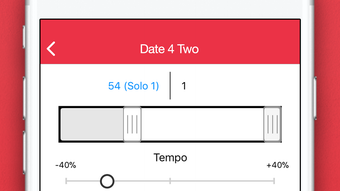
- Tempo Adjustment – The app enables slowing down playback for difficult sections and gradually increasing speed to build proficiency. This feature supports incremental mastery of challenging passages.
- Key Transposition – Users can change the pitch of a track to match their vocal range or instrument tuning, making it easier to practice in a comfortable key.
- Metronome and Counter Tools – Built-in timing aids help maintain consistent rhythm and track repetitions during practice sessions, improving precision and muscle memory.
- Recording Functionality – Users can record their own performances to review progress over time, identify areas for improvement, and build a personal practice archive.
- Performance Mode – A dedicated mode for simulating live performances, allowing users to create custom setlists, adjust tempo and pitch per song, and manage playback with real-time controls.
- Playlist Management – Users can add, remove, and reorder songs in their playlist, enabling the creation of personalized performance sequences.
These features collectively support a structured and adaptive learning environment. For example, a guitarist learning a complex solo can isolate the lead line, slow the tempo to 50%, and record their attempts to compare with the original. Similarly, a band preparing for a show can use performance mode to rehearse their setlist with adjusted tempos and keys, ensuring cohesion and timing accuracy.
User Interface, Workflow & Performance
The user interface of A-ccompany appears to be designed with clarity and ease of access in mind, prioritizing essential controls within a streamlined layout. Navigation is likely intuitive, allowing users to switch between practice and performance modes with minimal effort. Core functions such as tempo adjustment, key transposition, and playback controls are expected to be accessible through clearly labeled buttons or sliders.
The workflow is structured around a single-song or playlist-based approach, with logical progression from loading a track to applying adjustments and initiating playback. The app’s performance is expected to be stable during typical use, with minimal lag during tempo changes or track switching. However, exact performance details were not specified by the developer.
Resource usage, including CPU and RAM behavior, was not provided. The developer did not specify whether background processes impact system performance. General software behavior patterns suggest that a 150 MB application should operate efficiently on modern systems, though performance may vary depending on hardware and audio file formats.
Stability during extended practice sessions or live playback remains unconfirmed. No reports of crashes or freezes were included in the provided information.
Compatibility & System Requirements
A-ccompany is compatible with both Windows and Mac operating systems, supporting a broad range of desktop users. The software version is 1.0, with a download size of 150 MB. This indicates a lightweight application suitable for installation on most modern machines.
The developer did not provide additional system requirements, such as minimum RAM, processor speed, or disk space beyond the base installation size. Compatibility with older OS versions was not mentioned. It is unclear whether the app supports touch interfaces or external MIDI controllers.
The developer did not specify whether audio drivers or additional codecs are required for optimal playback. Users should ensure their system meets standard desktop audio playback requirements. Exact performance details were not specified.
Pros and Cons
Pros
- Free to download and use, removing cost barriers for musicians.
- Offers dual functionality for both practice and performance modes.
- Includes advanced features like track isolation and tempo control.
- Supports key transposition for personalized practice.
- Provides recording tools to track progress over time.
- Customizable playlist management for live set preparation.
Cons
- Developer background and company information were not disclosed.
- No detailed system requirements were provided.
- Resource usage and performance under load were not specified.
- Limited information on audio file format support.
- No mention of cloud sync or cross-device access.
FAQ Section
Is A-ccompany available for both Windows and Mac?
Yes, A-ccompany is compatible with both Windows and Mac operating systems.
Is the software free to use?
Yes, A-ccompany is available at no cost. There are no subscription fees or in-app purchases mentioned.
Can I use A-ccompany offline?
Yes, the application is designed as a desktop tool and does not require an internet connection to function after installation.
What types of music files does A-ccompany support?
The specific audio file formats supported were not detailed in the provided information.
How often is A-ccompany updated?
The release date of version 1.0 was March 15, 2024. No information about future update frequency was provided.
Final Thoughts & CTA
A-ccompany presents a compelling solution for musicians seeking to improve their practice routines and performance preparation. Its combination of track isolation, tempo control, key adjustment, and recording tools delivers a comprehensive toolkit for skill development. The dual-mode design—practice and performance—ensures versatility across different stages of musical growth.
While the lack of detailed system requirements and performance data limits deeper technical assessment, the core functionality appears well-aligned with the needs of students, hobbyists, and professionals alike. The free pricing model enhances accessibility, making it an attractive option for users exploring new practice tools. For musicians who value control, customization, and structured learning, A-ccompany offers a robust foundation.
Download A-ccompany now and revolutionize the way you practice and perform music.







